Skip to contentRotozoomer, drawn by hand in a few lines of JavaScript
The machine that never was
Intuition Engine
Seven CPU architectures on one bus.
Seven CPU architectures share one memory bus: IE64, IE32, 68020, Z80, 6502, x86 and PowerPC 604e. Pair them with video and sound hardware from the worlds of Commodore, Atari, Sinclair, BBC, Amstrad and IBM, plus Mode 7 affine texturing, coppers, blitters and a 3dfx Voodoo.
The live appliance also gives AmigaOS a machine of its own: 8 MiB of chip RAM, almost 1.75 GiB of fast RAM when memory permits, WarpOS and Amithlon x86 compatibility. Its extended ROM brings the IE graphics, sound engines and worker CPUs into Amiga programs through libraries, drivers and an AmigaOS SDK. See what this Amiga can do.
Intuition Engine is a demoscene platform for combinations no original computer could run: a 6502 playing SID music while an x86 drives Atari ANTIC graphics, or a 68020 using a copper with PC VGA. It is free and open source, built for people who still write rotozoomers by hand and people writing their first. I have been building it since 1991.
The x86-64 live USB image requires an x86-64-v3 processor. Its Voodoo rendering also needs working Vulkan support. These requirements do not apply to the browser build. Live USB setup.
IE64 BASIC running directly on the machine. Load, inspect and change the supplied examples from the Ready prompt.
Start with a red dot and a sound. Launch the browser demo and type this at the Ready prompt:
10 SCREEN &H13
20 PALETTE 1, 63, 0, 0
30 PLOT 160, 100, 1
40 POKE32 &HF0800, 1 : REM switch the sound chip on
50 SOUND 0, 440, 200, 0, 128
60 GATE 0, ON : REM play the note
RUN
A red dot appears in the middle of the screen and a tone plays. Your program has written directly to the video and sound hardware. Type GATE 0, OFF to stop the tone. Type SCREEN OFF to turn off the VGA display. RUN AOT compiles and runs the same BASIC as native IE64 code.
The browser disk lasts for the current session. At the Ready prompt, use “Save to computer” below the display to keep your program before you reload or close the page. Before typing a different program, save your work, then type NEW to clear the stored lines.
Seven architectures, one busIE64, IE32, 68020, Z80, 6502, x86 and PowerPC can run at the same time, reaching shared RAM and MMIO devices.
Chips that never metA demo can run its CPU on one maker's silicon, its video on a second and its music on a third.
CPU workersBASIC, assembly, and C start worker CPUs through the coprocessor service and pass requests through mailbox rings.
IE Mon / IEScriptIE Mon and IEScript inspect CPU state, MMIO views, snapshots, and frame output through the running machine.
caller CPU
  -> MMIO register, machine monitor action, script call, or BASIC command
  -> MachineBus
  -> device, worker, or runtime service
  -> response through RAM, ticket, IRQ, or status
Impossible machine demos
These demos include combinations that no original computer offered: an Intel x86 driving Atari ANTIC graphics with Commodore SID music, or a 6502 painting a ZX Spectrum screen while an Amiga tracker plays. Several run the music on a second CPU. The IE copper changes registers on video chips that never had a copper of their own.
One effect, every way in
Fifteen implementations of one effect
The video compares fourteen versions through different CPUs, languages and guest operating systems. Six CPU versions perform the same calculations and write the same VideoChip registers. IE64 BASIC and IEScript reach those registers through their own interfaces, while EmuTOS and AROS use guest drivers and applications. One version halts IE64 after setup, then the copper and blitter calculate and render every later frame. The IE64 version plays a stereo SAP tune through two Atari POKEY chips. A fifteenth version adds PowerPC 604e, using Mode 7 with TED music.
The machine implements VGA, the TED 121-colour model, the ZX Spectrum ULA and ANTIC/GTIA as separate video systems. Each runs in one of its characteristic modes under a CPU that was never originally paired with it.
vga_text_sap_demo.ie80
Z80
A Z80 fills all 2,000 VGA Mode 03h cells with a four-wave plasma, palette fades, an integrated logo and a persistent scroller while Atari POKEY plays an embedded SAP tune.
A 64-bit IE64 RISC CPU uses its FPU to render a red-and-white chequered Boing ball through ZX Spectrum ULA video, with synthesised SFX, reverb and real-time MIDI music.
Motorola 68020 CPU on PC VGA, while a second CPU, a 6502 core, plays the C64 SID soundtrack. The native IE Video Copper rewrites the VGA palette registers in step with the beam as it sweeps the screen, for raster bars real VGA silicon never had a copper to make.
boterham8.ie86 renders on the x86 CPU, encodes the picture into HAM8 bitplanes and displays it through Lisa, with a SID soundtrack.
Build the demo from the source checkout with make boterham8. Copy sdk/examples/prebuilt/boterham8.ie86 to the machine's file area, then type RUN "boterham8.ie86" at the BASIC prompt. It is not included on the Demos disk.
The same RoboCop intro, identical down to the IE Video Chip blitter and copper effects and the AY theme in Plus mode, rebuilt for four different instruction sets: IE32, 68020, Z80 and 6502.
The live image includes complete, playable ports. Mario Kart 64 divides its work between four processors and a Voodoo. The same Chocolate Doom engine runs on x86 and the 68020, exercising the shared bus through two instruction sets. Part VIII of the Reference Guide covers the full porting process.
Coprocessor case study
Mario Kart 64
4 CPUs + Voodoo
mk64-ie runs four processors at once inside a single mariokart64.ie68: a main 68020 building each display list, a second 68020 translating it into draw calls, a third 68020 running the audio sequencer, and an IE64 worker doing transform and lighting, with the geometry feeding a Voodoo. The two additional 68020 CPU cores use the M68K worker type's two available instances. How the four CPUs split the work.
The same engine as a bare-metal 68020 flat program, iedoom.ie68, a true ELF-to-flat build with no hosted OS. Same doom1.wad, same renderer, a different CPU.
On the live appliance, AmigaOS, the Amiga chipset, WarpOS and Amithlon x86 compatibility share a machine with seven CPU architectures, Mode 7 and modern gamepad input. Hardware-accelerated Warp3D supports 68K and PowerPC programs through the Voodoo. The IE Picasso96 driver provides accelerated graphics, with CyberGraphX API compatibility through Picasso96.
Sound hardware includes three Commodore SIDs with 6581 and 8580 models, Atari POKEY, AY/YM PSG, TI SN76489, Commodore TED and Amiga Paula, alongside the native IE SoundChip synthesiser. The display stack combines IE VideoChip, VGA, TED, ANTIC, Lisa, ULA and Voodoo layers.
Run Amiga software, write new AmigaOS programs and put the other processors and chips to work through the supplied libraries and SDK. Supply your own Kickstart ROM and AmigaOS.
Built into the machine
An Amiga with its own extended ROM
The IE extended ROM gives AmigaOS access to the whole machine, beyond the Amiga chipset. It supplies the libraries, drivers and support files for other processors, accelerated graphics, sound engines, networking and storage.
Processors: powerpc.library and its PowerPC kernel for WarpOS, Amithlon x86 integration, and a coprocessor service for work on the other IE CPUs.
Graphics: the IE Picasso96 board driver with accelerated drawing, plus four drivers for hardware-accelerated Warp3D in 68K and PowerPC programs.
Sound and MIDI: AHI itself, its IE audio driver and AUDIO: handler, a CAMD MIDI driver, and iesound.library for the IE sound engines.
Display effects: iecopper.library, iemode7.library and ielayers.library for copper lists, texture rotation and scaling, display-layer claims and a console over the Amiga picture.
Storage and networking: hard-disk and CD devices, a CD filesystem, directory volumes, bsdsocket.library and a SANA-II network device.
Device interfaces: USB, PCI, GPIO and a clipboard driver. Physical device access needs the relevant setup; the standard appliance does not enable physical GPIO, PCI passthrough or Amiga clipboard integration.
An Amiga program can use a 64-bit worker CPU, draw textured Voodoo graphics and play SID music. It can also drive the ULA, TED or ANTIC directly from AmigaOS. The SDK for AmigaOS supplies the IE headers, examples and references.
Processors and memory
68K, PowerPC and x86
Three instruction sets for Amiga software
The 68020 and 68881 run AmigaOS with Alice, Lisa, Paula and the CIAs. A PowerPC 604e board runs alongside it, with powerpc.library and its PowerPC kernel supplied in the IE extended ROM for WarpOS programs.
The Amithlon compatibility layer loads Amithlon relocatable i386 ELF modules through AmigaDOS and connects x86 code to 68K library calls and callbacks. The modules run on IE's x86 CPU core with JIT compilation, not directly on the physical CPU. Extended-ROM services handle native library functions, task and process entry, interrupt servers and audio hooks. The ROM supplies amithlon.resource and umilator.resource interfaces, plus powerpci.library and atirq.resource for PCI access and interrupts. This is an Amiga application interface, not a loader for arbitrary x86 executables.
AmigaOS 3.1 is the tested system for Amithlon compatibility. The x87 uses 64-bit floating-point arithmetic, not full 80-bit precision. SSE, SSE2 and 3DNow! arithmetic are not supported. Physical audio playback through an EMU10K card has not been tested.
IE Mon inspects the Amithlon x86 registers and code and identifies calls across the 68K/x86 interface. Amiga programs can combine these instruction sets with the wider IE hardware, its sound engines and its worker CPUs.
Expanded Amiga memory
8 MiB chip RAM and almost 1.75 GiB fast RAM
The Amiga system provides 8 MiB of chip RAM by default, with 2 MiB and 4 MiB configurations also supported. On the appliance, fast RAM can reach almost 1.75 GiB, subject to available backing memory and configuration.
The extended ROM makes this memory available to AmigaOS. Use it for larger pictures, samples, programs and working buffers.
More CPUs on the same bus
Give the work to another processor
Amiga programs can submit jobs to the IE coprocessor service and receive completion notifications through Amiga interrupts and Exec signals. The machine has ten worker instances across IE64, IE32, 68020, Z80, 6502, x86 and PowerPC. The Amiga system controller uses IE64 instance 0, leaving nine for Amiga programs.
Use a 64-bit IE64 worker for calculations, a 6502 for a sound routine or another 68020 for rendering. Workers share memory and devices with the caller. See the worker model.
Graphics and sound
Chipset, framebuffer and 3D
Amiga graphics and Voodoo on one machine
Use Alice and Lisa for bitplanes, sprites, HAM6, HAM8, Extra Half-Brite, AGA palettes, the Amiga blitter and copper, and genlock. The IE Picasso96 board driver adds the IE framebuffer and accelerated drawing. Picasso96 also provides CyberGraphX API compatibility for applications.
The ROM supplies separate 68K and PowerPC Warp3D hardware and graphics drivers for the Voodoo. These provide hardware-accelerated textured 3D through Warp3D, with GPU rendering through Vulkan on the live appliance. Programs can also control the IE 3D registers directly with the SDK headers.
Sound and music
Paula, AHI and the IE sound engines
The extended ROM carries AHI itself, the IE audio driver, audio modes and preferences, and the AUDIO: handler. The CAMD driver connects Amiga MIDI software to the internal synthesiser or configured external MIDI devices.
iesound.library opens the IE sound engines to Amiga programs: PSG, SN76489, three SIDs, POKEY, TED, AHX, MIDI, MOD and WAV. The library provides engine claims and, where supported, tune playback, subsong selection and playback status or position. It checks channel use against Paula and other sound-engine claims.
Hardware effects from AmigaOS
Another copper and Mode 7
iecopper.library controls the IE copper, whose lists can change registers on different chips across the bus. iemode7.library provides affine texture rotation and scaling through the IE blitter.
ielayers.library
Drive other video chips from AmigaOS
Claim TED, ANTIC, ZX Spectrum ULA and Voodoo display layers from an Amiga program. ULA and Voodoo sit above Lisa in the fixed display stack. TED and ANTIC sit below it and can show when Lisa's output is disabled or through areas made transparent by genlock.
ielayers.library reports the layer order, register addresses and visibility relative to Lisa. Ask IELayers_Base for a chip's register address, then program it directly through the Amiga's IE register mirror at 0x01F00000. The library coordinates claims between callers; it does not draw the chip's display or enforce exclusive hardware access. IE VideoChip, VGA and Lisa are not available to claim.
Add a scrolling text console over the Amiga chipset or RTG display without changing its bitmap. Choose the position, ink and paper colours, and up to 80 by 32 cells in the system's default font. The chosen font, dimensions and position must fit within a 640 by 512 pixel area. One console can be open at a time. IELayers_ConsoleBuffer gives your program the RGBA buffer for a custom graphical overlay as well as text.
For textured Voodoo rendering, upload pixels from guest RAM through the chip's registers. IELayers_Memory does not expose direct access to its texture-memory aperture. The SDK for AmigaOS includes the layer and genlock examples.
Input, storage and devices
IE game controllers
Modern gamepads, Amiga game ports
Use modern gamepads with Amiga software through the Amiga hardware registers. The IE gamepad system supplies joystick directions and fire buttons, analogue readings and the seven-button CD32 controller protocol. The first gamepad feeds Amiga joystick port 1; port 0 keeps the mouse.
The extended ROM also supplies mouse-wheel and fourth-button events through the NewMouse convention for Amiga software that supports it.
New IE games can read up to four controllers directly, with a common button layout and both analogue sticks. BASIC, assembly and C use the same gamepad interface on the appliance and in the browser.
On the appliance, Amiga software can use the supplied bsdsocket.library or a separate Amiga TCP/IP stack through the SANA-II network device. The default network relay provides the device's connection. The machine checks the system directory for an installed stack and can disable its own socket library to let that stack provide the service.
The ROM also supplies openpci.library, the Poseidon hardware driver ieusb.device for the OHCI USB controller, and gpio.library for pin input, output and edge detection.
Use the appliance's device menu to select available USB, MIDI and serial devices. The GPIO and PCI interfaces are implemented, but physical GPIO and PCI passthrough are not enabled by the standard appliance setup.
Storage and integration
Disks, CDs, clock and ports
Boot and work from floppy images, hardfiles, directory volumes and CD images. The extended ROM supplies hard-disk and directory-volume services, iecd.device and CD filesystem support. Gayle provides the IDE register interface. The machine also provides a battery-clock interface, CD audio, printer output, serial links and parallel-port sampling.
On the appliance, supported physical optical drives can also serve Amiga software through iecd.device. SCSI command passthrough lets programs send commands to a configured drive.
IE Mon inspects the CPUs and devices, steps through code and records reverse history. Whole-machine saves and IEScript automation use the same machine. The ROM also contains a clipboard driver, but Amiga clipboard integration is disabled in the standard appliance setup.
CD32 hardware
Akiko, CD audio and persistent NVRAM
Akiko provides chunky-to-planar conversion, a CD controller with DMA and interrupts, and non-volatile storage saved in cd32.nvram. ISO images supply data discs; CUE/BIN images can carry data and CD audio tracks.
The ROM menu accepts a user-supplied CD32 Kickstart and extended-ROM pair, or a combined ROM image. The IE driver ROM remains separate. These hardware features do not imply compatibility with every CD32 game.
Machine controls
Change media, save and reset
Press Ctrl+End to open the Amiga controller menu. Select ROMs by filename, change floppy and CD images, set floppy write protection, and adjust machine speed and the CPU instruction rate. On the appliance, device pages select available USB, serial, MIDI, disk, parallel and CD devices. Some changes take effect at the next launch.
Press Ctrl+F9 to save the machine and Ctrl+F8 to load it. A save or load can be refused while Amithlon native state is live. See the snapshot limits before relying on a save.
For an Amiga warm reset, hold Ctrl and both Amiga keys, mapped to the left and right Meta keys. F10 performs an engine hard reset to BASIC. Save your work before either reset.
The SDK for this Amiga
Write software for the whole machine
The AmigaOS SDK supplies 16 IE-specific C headers, five WarpOS headers, the public hardware register header and ie68.inc. They cover graphics, sound, copper, Mode 7, layers, coprocessors, PowerPC, sockets, networking, clipboard, MIDI, GPIO, PCI and USB.
Five C examples demonstrate sound, display layers, copper lists, Mode 7 and genlock. Build the examples with vbcc and a separate AmigaOS NDK. The IE libraries and drivers come with the extended ROM.
Supply your own Kickstart ROM and AmigaOS files. Place the default Kickstart 3.1 A1200 ROM, kick31_4068_a1200.rom, at the top level of the IESHARE partition. Type AMIGA to enter the Amiga system, or name a floppy image:
AMIGA "game.adf"
The live image supplies an empty AmigaOS directory on IESHARE for the system volume, normally DH0:. It provides a destination for your AmigaOS installer. The volume becomes bootable when it contains S/Startup-Sequence. Kickstart and AmigaOS are not included. The IE extended ROM supplies the IE boot services, libraries and driver files.
Install Picasso96 for its graphics interface, Warp3D.library or Warp3DPPC.library for Warp3D, and Poseidon for its USB stack, as needed. These packages are separate from the IE extended ROM, which supplies their IE hardware drivers.
Start at the BASIC prompt and use the same machine throughout. RUN interprets your program, RUN AOT compiles it to native IE64 code, and TRANSPILE writes readable assembly. Assembly and C programs can use the other CPU architectures through the shared MachineBus devices. The copper, blitter, Mode 7, Voodoo and music players are available from BASIC. Part VII of the Reference Guide builds a complete intro from its first frame loop.
Start in BASIC
From idea to moving pixels
This program uses the copper to paint sixteen red raster bands while a SID tune plays. If you tried the first example, type GATE 0, OFF and SCREEN OFF first. Save any work you want to keep, then type NEW. Enter the lines below and type RUN. You can also use RUN AOT to compile and run it as IE64 code.
10 COPPER LIST
20 FOR Y=0 TO 15
30 COPPER WAIT 200+Y*8
40 COPPER MOVE &HF0048, 200+Y*8
50 COPPER MOVE &HF004C, 8
60 COPPER MOVE &HF0050, 40+Y*13
70 COPPER MOVE &HF0054, 1
80 NEXT Y
90 COPPER END
100 COPPER ON
110 SOUND PLAY "ODDNB.SID",0
Drop to assembly
Readable source, both ways
TRANSPILE writes your BASIC out as IE64 assembly you can read and edit; ASSEMBLE turns source back into a flat .ie64 image. Hand-write with ie64asm or ie32asm, and read an IE64 image back with the ie64dis disassembler.
Pick your CPU
Seven instruction sets, one machine
Build for any core: .ie64, .ie32, .ie65, .ie68, .ie80, .ie86 or .ieppc. Carry IE32 source across with ie32to64. Run the music on a worker CPU with COSTART and COCALL while another core draws the screen.
Effects
Copper, blitter and Voodoo
The copper rewrites registers in step with the beam and can address chips across the bus. The blitter provides copy, fill, line, masked and alpha copy, colour expand, scale, Mode 7 and raw memory copy. The Voodoo provides textured 3D. Compare fifteen rotozoomer implementations, including one which halts its CPU after setup.
Chip music
Play the real formats
Play chip music from BASIC with SOUND PLAY. Formats include Commodore SID and TED, Atari SAP, SNDH and YM, Amiga MOD and AHX, Spectrum and CPC AY files, VTX and several Spectrum tracker formats. VGM/VGZ playback supports SN76489 and AY chips. WAV, MIDI and Doom MUS are also supported. See the format list.
A stereo SAP tune drives two POKEY chips. A MultiSID file runs on two or three SIDs, with up to nine voices.
PSG, SID, POKEY, TED and AHX each have an optional Plus mode for enhanced sound. Switch it on or off from BASIC while using the same tune and sound registers.
SOUND PLAY "DEMO_MOD.MOD"
SOUND PLAY "DEMO_AHX.AHX",1
SOUND PLAY "SHADOWOFTHEBEAST.MID"
SID PLUS ON
SOUND PLAY "DEMO_SID.SID"
SID PLUS OFF
SOUND STOP
Debug it like hardware
Freeze, step, rewind
IE Mon freezes the machine, single-steps one core while the rest stay frozen, sets conditional breakpoints and watchpoints, and restores recorded CPU, memory and device state. IEScript drives the same machine from Lua for repeatable tests. The machine monitor section explains whole-machine saves and the limits for external devices.
A finished production can be shared as source and assets. wobble_zoom.bas is one complete example.
A complete demo, start to finish
wobble_zoom.bas
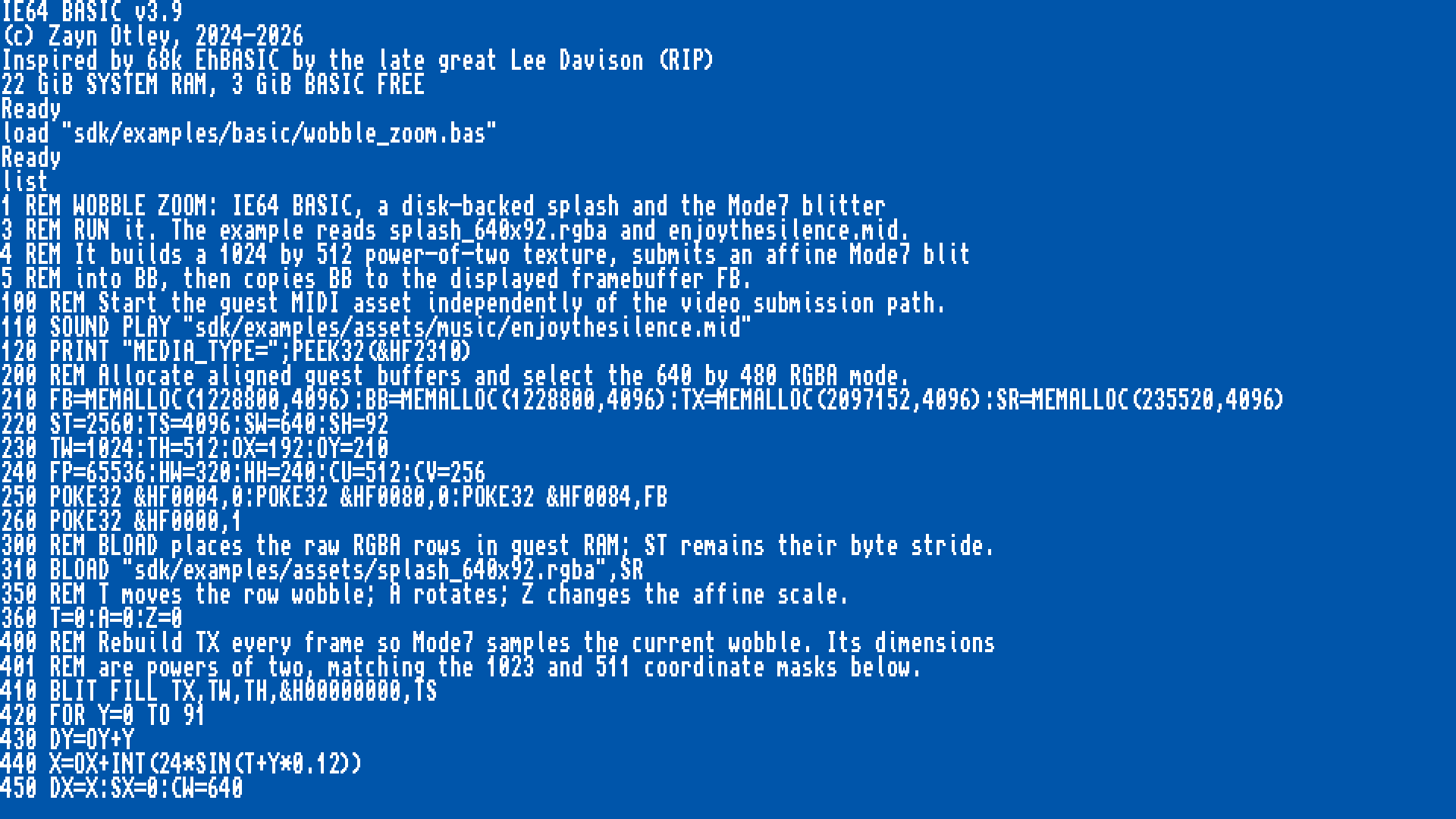
This BASIC demo moves a splash image line by line, rotates and scales it through the blitter's Mode 7, and plays a MIDI soundtrack. The browser disk includes the source, image and music. Here is an excerpt from the program; load the full file to run it:
110 SOUND PLAY "sdk/examples/assets/music/enjoythesilence.mid"
310 BLOAD "sdk/examples/assets/splash_640x92.rgba",SR
420 FOR Y=0 TO 91
440 X=OX+INT(24*SIN(T+Y*0.12))
510 BLIT COPY SA,DA,CW,1,ST,TS
520 NEXT Y
660 BLIT MODE7 TX,BB,640,480,U0,V0,DC,DS,0-DS,DC,1023,511,TS,ST
710 BLIT MEMCOPY BB,FB,1228800
720 VSYNC
760 GOTO 400
Open the browser demo, type LOAD "sdk/examples/basic/wobble_zoom.bas", then RUN. Chapter 53 of the Reference Guide explains how it works, buffer by buffer.
To share a browser demo, send the source and its assets. The recipient can add them with the file picker below the display, then load and run the program. At the Ready prompt, use “Save to computer” to keep changes before closing the page. Programs supported by COMPILE can also be shared as standalone .ie64 images with their required assets. The SDK section explains the build commands.
The x86-64 live USB image starts Intuition Engine directly. It requires UEFI boot and an x86-64-v3 processor. Voodoo rendering needs working Vulkan support.
Prepare the USB drive
Download the live-image ZIP archive and extract the .img file.
Choose a USB drive large enough for the extracted image. Back up anything you want to keep on that drive. Writing the image erases its existing contents.
Use balenaEtcher to write the extracted .img file to the USB drive. Check the selected drive before writing. Copying the file onto the drive will not make it bootable.
Restart the computer and select the USB drive from its UEFI boot menu. The image starts at the BASIC prompt.
The IESHARE partition holds your files, demos and SDK. To add files from outside the machine, type HOST POWEROFF at the BASIC prompt and wait for shutdown. Open IESHARE on a computer, copy your files, then safely eject the drive before booting it again.
A file named demo.ie64 at the top level of IESHARE runs with RUN "demo.ie64". Keep any assets it needs at the paths used by the program. DIR "Demos" lists the supplied demo folders. The Amiga setup instructions explain where to put your Kickstart ROM and AmigaOS files.
The Programmer's Reference Guide
A tutorial and reference in one book. It starts at the BASIC prompt: type short programs, inspect memory with PEEK, change hardware with POKE, then enter machine code directly in IE Mon. You do not need an assembler, a build system or a second computer to start. Seventy-one chapters and twelve appendices cover the CPU architectures, hardware and tools, a complete game port, and Amiga chipset and peripheral programming.
Why this book exists
The manual that comes in the box
The 8-bit Commodore under the Christmas tree in 1989 came with a manual that assumed an eleven-year-old could learn to program the machine, and it was right. This guide is written in that spirit: for kids starting from nothing, for sceners who want every register, and for anyone who wants to learn game and demo programming from scratch, on the machine, for the machine.
Never programmed before
Five milestones to start with
Start with these five projects:
First command: Chapter 1 starts you at the Ready prompt.
First picture on screen: Chapters 3 and 4.
First moving effect: Chapter 47, Your First Frame Loop.
First effect locked to music: Chapter 54.
First complete intro: Chapter 56.
Everything between the milestones is optional.
Need every register
The full reference underneath
The same book documents all seven CPU architectures, the video and sound chips, the memory model and MMIO maps, timing and traps, coprocessors, IE Mon and IEScript. Part VIII covers a full game port. Part IX covers Alice, Lisa, the Amiga blitter and copper, CIA timers and Amiga peripherals. Twelve appendices hold the tables you will keep open while you code.
Chapter 55 shows how the blitter can change a copper instruction before the copper reads it. Chapter 52 develops the stopped-CPU rotozoomer. Chapter 68 builds a HAM8 colour strip from BASIC and explains how to convert an RGB picture into HAM8 bitplanes.
Part
Chapters
What you learn
I. Intuition Engine BASIC
1 to 2
The BASIC dialect and its full keyword vocabulary.
II. Programming Graphics
3 to 10
The display model, VideoChip, VGA, TED, ANTIC/GTIA, ULA, Voodoo, and tile and sprite layers.
III. Programming Sound and Music
11 to 23
Every sound chip and player, from SoundChip and SID to MOD, MIDI/MUS and Paula DMA.
IV. BASIC to Machine Language
24 to 35
The memory model, all seven CPU architectures, timing and traps, coprocessors, IE Mon and IEScript.
V. Input / Output Guide
36 to 40
Disk and file I/O, the HOST command, keyboard, mouse and controller input, serial, and network sockets.
VI. Whole-Machine Project
41 to 46
Interrupts, raster timing, program layout, and two cookbooks, built into a working machine.
VII. Demo Programming
47 to 57
A guided build from a first frame loop to a complete intro, then the move beyond BASIC.
VIII. A Full Game Port Case Study
58 to 67
A complete game port, from Fast3D to hardware T&L and native IE audio.
IX. Native Chipset and Peripheral Programming
68 to 71
Alice and Lisa displays, the Amiga blitter and copper, CIA timers, parallel I/O and Amiga peripherals.
The guide is written to be read in order, one finished thing at a time. The preface and the frame-loop chapter each read on their own if you want a taste before the full download.
Seven CPU architectures, one bus
A profile selects a CPU architecture, loader and RAM ceiling. Any CPU can start concurrent workers through the coprocessor service. The cores share MachineBus RAM and devices, with address mappings for each CPU and profile. None of these details is required before starting at the BASIC prompt.
CPU views
How each CPU accesses the machine
Every CPU keeps its native idioms, and they all reach the same bus. A Z80 port write, an x86 IN/OUT, a 6502 paged or banked access, and a 68020 absolute address all land on the same MachineBus devices and RAM that IE64 sees. Guest code keeps the access patterns natural to its own CPU while reaching the same devices.
The CPU interfaces preserve numeric device-register values across byte orders. The 68020 and PowerPC use big-endian RAM. The other CPUs use little-endian RAM. Coprocessor mailboxes use little-endian words; request descriptors select the byte order for shared data.
Concurrency
Many CPUs at once
The coprocessor service supports ten workers across seven CPU architectures, running concurrently on the same bus. M68K, x86 and IE64 each support two worker instances. IE32, 6502, Z80 and PowerPC each support one. CPUs have their own interrupt lines, and each device uses its defined target and delivery path.
The appliance sizes guest RAM at boot from available machine memory, less a reserve. The browser build has a separate memory limit. SYSINFO reports the backing size, total and active guest RAM, low-window bounds and profile ceilings; IE64 also reads CR_RAM_SIZE_BYTES.
Bus address ranges cover file I/O, media load, Program Executor, terminal, keyboard, mouse and USB gamepad input, CPU wait, Voodoo apertures, Bootstrap HostFS, and SYSINFO.
64-bit PC, data, stack, control registers, and optional paged MMU.
JIT-backed, with FPU native/helper paths.
IE32
.iex, .ie32
Fixed 8-byte 32-bit RISC-like instruction stream.
JIT-backed.
6502
.ie65
Byte-oriented code uses mapped helpers for MachineBus devices.
JIT-backed.
Z80
.ie80
Register-pair and port idioms drive MachineBus memory and MMIO.
JIT-backed.
M68K
.ie68, EmuTOS, AROS, AmigaOS
68020-class integer code uses absolute bus addresses and profile bridges.
JIT-backed, including 68881-style FPU native/helper paths.
x86
.ie86
32-bit flat guest binaries can use MachineBus file, video, audio, and coprocessor devices.
JIT-backed, including x87 FPU paths. The interpreter also supports x87 environment save and restore.
PowerPC 604e
.ieppc, Amiga WarpOS programs
32-bit integer core, 32 floating-point registers, supervisor state and MMU. The Amiga PowerPC board runs alongside the 68020.
JIT-backed, with floating-point native/helper paths.
Lifecycle
Reset and reload
Reset and load routines stop the active scripts, rendering, media and CPUs before setting up the selected machine profile. They reconnect the machine monitor and Program Executor and reload the configured coprocessor services.
IE64 CPU
The native 64-bit core
A 64-bit RISC load-store CPU with 32 general-purpose registers (R0 hardwired to zero), fixed 8-byte instructions and a 16-register control bank. Integer branches compare registers directly, so there is no flags register. The x86-64 live image JIT-compiles it to native x86-64 code, while the browser build compiles hot blocks to WebAssembly.
The FPU adds 16 IEEE-754 registers, single precision with double precision on even and odd pairs. A six-level paged MMU brings address translation, page-level access control and supervisor access guards, with a hardware trap-frame stack that preserves the fault-control registers across nested traps, so a handler survives a second fault without saving them by hand. Six sequentially-consistent 64-bit atomics, compare-and-swap, exchange, fetch-and-add and the bitwise operations, each act as a full memory barrier for shared-memory work. IntuitionOS and BASIC AOT both target it.
JIT
JIT execution
The engine has x86-64, ARM64 and WebAssembly JIT compilers for all seven CPU architectures: IE64, IE32, M68K, x86, Z80, 6502 and PowerPC 604e. The x86 browser JIT requires WebAssembly SIMD. Available JITs start enabled, including programs launched from BASIC and coprocessor services. Instructions and accesses that cannot stay in compiled code use an interpreter or helper path with guest state preserved. Floating-point paths cover the IE64 FPU, M68K 68881, x86 x87 and PowerPC FPU.
IE64 remains JIT-compiled with its paged MMU enabled. Compiled loads and stores can use cached address translations directly. Accesses that need further checks use helper paths.
MMIO hardware map
Low-level code controls devices through bus registers. The ranges below use the default IE address map. In the Amiga profile, the 68020 reaches the IE register aperture through a mirror at 0x01F00000, leaving its original low-memory range available as chip RAM.
Common ranges
SYSINFO publishes RAM and feature bits. File I/O adds the IE64 FILE_DATA_PTR64 extension. Media load, Program Executor, terminal, keyboard, mouse and USB gamepad input, CPU wait, shared network sockets, Voodoo apertures, Bootstrap HostFS, and the gated host-command helper map as bus services. On the appliance, the socket block gives machine-language programs IPv4 TCP and UDP in recognised non-BASIC modes. These socket services are not available in the browser build.
From BASIC, HOST NET configures WiFi, HOST UPDATE updates the installed appliance packages from the signed Intuition Engine repository, verifying the engine checksum and version and restoring the previous binary if validation or the restart check fails, and HOST REBOOT and HOST POWEROFF restart or shut it down.
SYSINFO_EXIT at 0xF241C lets a guest request the end of the machine run with a signed 32-bit exit status.
Build games for up to four gamepads on the appliance or in the browser. Controllers with a recognised standard layout use the same button bits and stick axes, so your program reads a common layout across controller models. Each pad provides 17 button bits, including the four directional buttons, and two analogue sticks with four signed 16-bit axes.
From BASIC, PAD(n) reads the button bits. PADX(n) and PADY(n) read the left stick, and joydefs.bas supplies the button names. Assembly and C programs read the same state through the CPU's mapped gamepad registers. The browser build receives input through the browser Gamepad API.
The read-only block at 0xF25C0-0xF25FF reports connected pads and their count. Four twelve-byte records begin at 0xF25D0, each holding the button bits and both sticks. The Amiga system also maps gamepads to its joystick ports and CD32 button protocol.
0xF25C04 pads17 button bits2 sticks
Mouse buttons and wheel input
Guest programs can read four mouse buttons through MOUSE_BUTTONS at 0xF0738. Vertical wheel steps use 0xF0764; horizontal steps use 0xF0768. Each wheel register returns a signed count and clears it on read. The status register at 0xF076C reports pending steps without consuming them. Use the CPU's mapped register addresses for banked or mirrored access.
Amiga device interfaces
The Amiga profile adds a SANA-II Ethernet interface at 0xF2A80, PCI configuration registers at 0xF2B00 and the native Gayle IDE block at 0xF7640. The 68020 uses the IE aperture mirror for these addresses. Device presence and physical access depend on the configuration.
The clipboard bridge occupies 0xF2390-0xF23AF. Its Amiga driver is disabled in the standard appliance setup.
Random data and GPIO
The entropy block at 0xF2A00-0xF2A0F supplies random bytes from the host. GPIO registers at 0xF2A10-0xF2A7F provide pin input, output and edge detection when a GPIO device is configured. Check the SYSINFO feature bits before use. GPIO outputs are limited to the pins the host permits. BASIC provides GPIO MODE, GPIO EDGE and GPIO(pin). The standard appliance setup does not enable physical GPIO.
Profile bridges
AROS maps DOS packets, Paula-style audio DMA, clipboard access, IRQ diagnostics, and live MIDI through a CAMD driver (DEVS:Midi/ie) under camd.library. It also supplies guest-side integration for the shared network-socket block. EmuTOS uses an Atari MIDI ACIA shim that feeds the live-MIDI engine.
EmuTOS and AROS have drivers for the IE hardware. The Amiga system combines AmigaOS, WarpOS and Amithlon x86 compatibility with the wider IE hardware and its own extended-ROM services. IntuitionOS is the machine's own operating system, written from scratch in IE64 assembly and still in development.
Guest
CPU view
Graphics route
Other device routes
EmuTOS
M68K
Hardware-accelerated IE VideoChip driver; EmuTOS runs a 1920 x 1080 CLUT8 desktop with direct VRAM and blitter-backed drawing.
Alice and Lisa chipset display; Picasso96 framebuffer; 68K and PowerPC Warp3D drivers for Voodoo.
Paula, CIAs, floppy and hardfile images, directory volumes and CD media. Extended-ROM drivers support AHI, CAMD, sockets and the IE libraries.
IntuitionOS
IE64
graphics.library requests CHIP and VRAM grants, maps them with SYS_MAP_IO, and opens VideoChip mode 7.
hardware.resource brokers access to CHIP registers and monopoly VRAM grants.
EmuTOS
EmuTOS VideoChip driver
EmuTOS gets a hardware-accelerated IE VideoChip driver through the IE target. The implementation runs a 1920 x 1080 CLUT8 desktop over direct VRAM and uses the VideoChip blitter for screen and VDI drawing. It reads keyboard and mouse MMIO, and drives timer IRQ level 5 and VBlank IRQ level 4.
rotozoomer_gem.prg is a windowed GEM application written in M68K assembly for the IE hardware. It runs on the EmuTOS desktop and uses the VideoChip blitter's Mode 7 for rotation and zoom. Its Amiga AHX soundtrack plays through the native SoundChip synthesiser, which recreates the AHX oscillators and envelopes without Paula.
AROS maps a 64 MiB VideoChip VRAM slice and supports big-endian VideoChip reads. Its hardware-accelerated iegfx.hidd defaults to 1920 x 1080 scanout and uses the VideoChip blitter for accelerated drawing. The system-tree build includes Libs/cybergraphics.library and installs ScreenMode and palette preferences. Filesystem packets use the AROS DOS handler block, and a configured host directory is served to the guest as real files through the AROS DOS handler. AROS boots all the way through to the Wanderer desktop.
Four guest DMA channels run through the AROS Paula-style DMA shim at 44.1 kHz, become SoundChip FLEX DAC writes, and complete with M68K level-3 IRQs. The AROS build also runs kernel-ie-m68k-ahidrv, validates Devs/AHI/ie-audio.audio, and maps host sockets and clipboard access through MMIO.
CHn: PTR LEN PER VOL
DMACON  0xF22A0
STATUS  0xF22A4
INTENA  0xF22A8
IntuitionOS · native OS
The machine's own OS, in development
IntuitionOS is the machine's own operating system, written from scratch in IE64 assembly and modelled on the Amiga OS, down to Amiga-style volumes such as C:, S: and LIBS:. Its core is IExec, a protected capability-based microkernel inspired by Amiga Exec and QNX Neutrino, where services and drivers are separate protected modules that talk through named message ports. It is a work in progress, not a finished system. Today it boots to a shell with real DOS commands (dir, list, type, assign and more), runs up to 255 pre-emptive tasks that talk through Exec-style message ports, discovers libraries with OpenLibrary and a protected module registry, and loads ELF programs. It brokers hardware through a grant model, with graphics.library opening 960 x 540 scanout in VideoChip mode 7, and reports faults the old way, with a GURU MEDITATION.
A task only reaches the memory and hardware it was granted. Each task has separate limits for private pages, message ports, waiters, shared-memory pages and grants. Shared memory is handed out as opaque capability handles, reference-counted and scrubbed to zero when the last mapping drops, and MMIO maps only through explicit grants. The IE64 MMU gives every task its own page tables with separate code, stack and data and W^X enforcement, guard pages catch overruns, and the kernel validates every user pointer before it reads across the supervisor boundary.
At build time, programs are position-independent for ASLR, no segment may be both writable and executable, and the ELF loader rejects dynamic linking, external-symbol relocation and text relocations. Kernel ASLR and a stack canary are in progress.
MIDI split
Live MIDI by profile
Raw byte-stream registers for live MIDI sit at 0xF0BF4-0xF0BF6. EmuTOS uses an output-only MC6850 ACIA shim at $FFFC04 and $FFFC06, feeding the live-MIDI parser. AROS uses an ie-m68k CAMD driver (DEVS:Midi/ie) under camd.library. The current source tree has no IntuitionOS MIDI driver path.
Driver-level demos
AROS rotozoomer demos
The live image includes EmuTOS rotozoomer_gem.prg plus AROS RotoAPI, RotoHW, RotoAPIc, and RotoHWc. The AROS pairs separate API drawing from direct-hardware access in assembly and C.
Use COSTART with a CPU type and service filename to start a worker processor. The worker executes 6502, Z80, 68020, x86, IE32, IE64 or PowerPC 604e instructions and communicates through shared RAM, mailbox rings and tickets. Your program can continue while the worker runs.
CPUs cooperate through shared RAM and devices. The coprocessor service supports ten concurrent workers: two each for M68K, x86 and IE64, and one each for IE32, 6502, Z80 and PowerPC. Each CPU has its own interrupt state. A caller queues a request and polls or waits on a ticket. BASIC provides named commands; assembly and C write the coprocessor registers and mailbox rings directly.
Request flow
CallerCOSTART / COCALL or MMIOPer-worker mailbox ringWorker CPUResponse or ticket
The instance argument selects worker 0 or 1 and defaults to 0, so the shorter forms without it still work. COCAPS, COINSTANCE and COSELSTATE report how many instances a type supports, which one is selected, and whether it is running.
Worker CPU
Service suffix
Instances
IE32
.iex, .ie32
1
6502
.ie65
1
M68K
.ie68
2
Z80
.ie80
1
x86
.ie86
2
IE64
.ie64
2
PowerPC 604e
.ieppc
1
What it is for
One job per processor
Split a demo across CPU cores: a 6502 running a sound routine, a 68020 drawing while an x86 calculates a plasma, each on its own instruction set, all feeding one screen. The same service image runs on either instance of a dual-instance type, so two 68020 or two IE64 workers can use the same code. COSTART starts the worker and COCALL submits a request. Your program can continue while the worker processes the request.
Case study
Mario Kart 64: four CPUs on one bus
The IE port of Mario Kart 64 runs four processors at once. A main 68020 runs the game and builds each display list, a second 68020 worker translates that list into draw calls, a third 68020 worker runs the audio sequencer, and an IE64 worker handles transform and lighting; the geometry the IE64 and translation workers produce feeds a Voodoo that rasterises the frame. The two 68020 workers are the M68K type's two instances, live in the same title.
The main 68020 takes the role of the Nintendo 64 CPU. The IE64 and graphics workers handle the RSP's graphics work, the audio worker handles its sound work, and the Voodoo takes the role of the RDP. The game and its worker code are packed into one mariokart64.ie68 image.
Programs control audio and video through bus registers. The tables below name the ranges used by the chip engines, players, Paula-style DMA, SoundChip/SFX, and video systems. The sound engines include SID from the Commodore 64, POKEY from the Atari 8-bits, the AY/YM from Spectrum, Amstrad and Atari ST, the SN76489 from the TI and Sega machines, and Paula from the Amiga.
IE SoundChip
The native SoundChip synthesiser
The native SoundChip provides ten FLEX voices and 32 SFX sample channels. Each FLEX voice has its own oscillator (square/pulse, triangle, sine, sawtooth and nine noise modes), ADSR envelope, sweep, PWM, ring modulation, hard sync and signed 8-bit DAC input. The mixed signal passes through overdrive, a global filter and reverb, followed by auto-levelling, compression and limiting.
It also carries RawlandMini, a built-in GM-style patch table, so Standard MIDI Files, Doom MUS and live MIDI play straight through the chip across 16 MIDI channels and 10 active voices, with GM-style instrument families and a drum channel.
Final output renders at 44100 samples per second with global filter, overdrive, reverb, and limiting. PSG defaults to 2000000 Hz. SN76489 uses 3579545 Hz NTSC and 3546893 Hz PAL; SID uses 985248/1022727 Hz; TED audio runs at 110840/111860 Hz; Paula/MOD period timing uses 3546895 Hz.
SoundChip/SFX mixer   44100 Hz
AHX song ticks         50/100/150/200 Hz
MOD and Paula periods  3546895 Hz source clock
WAV and MIDI/MUS       parsed, scheduled, mixed
Format coverage
Over twenty chiptune formats
The media loader detects the tune format and selects the chip. Tunes that call for more than one chip get more than one: a stereo SAP drives two Atari POKEY chips at once, and a MultiSID .sid runs on two or three independently emulated SID chips, up to nine SID voices together.
MOD 4/6/8chWAVMIDI SMFDoom MUSAHX/THXSID PSID/RSID/MultiSIDTED/TMFSAP B/CYM2 to YM6AYVGM/VGZSNDHVTXPT1/PT2/PT3STCSQTASCFTC
Plus mode
Optional enhanced rendering
Five classic engines, PSG, SID, POKEY, TED and AHX, each have an optional Plus mode. Leave it off for standard rendering, or switch it on for an enhanced render path with drive, stereo spread, room and per-voice balance, straight from BASIC with PSG PLUS ON, SID PLUS ON and the rest. The sound registers do not change; only the rendering does.
SID voice, pulse, ADSR, sync/ring, filter, and model state; TED two-voice sound and DAC mode; POKEY four channels, AUDCTL pairing, distortion modes, and readable polynomial tap.
Music and media players
AHX 0xF0B80, MIDI 0xF0BA0, MOD 0xF0BC0, WAV 0xF0BD8, SAP 0xF0D10, TED player 0xF0F10, media loader 0xF2300
Pointer, length, control, status, position, subsong, tempo, volume, and loader registers for AHX, MOD, WAV, MIDI/MUS, SID, PSG-family, SAP, and TED data.
AROS audio DMA and live MIDI
AROS DMA shim 0xF2260-0xF22AF, live MIDI 0xF0BF4-0xF0BF6
Four DMA sample channels into SoundChip DACs, completion status, interrupt enable, raw MIDI byte input, active status, and all-notes-off reset.
Native Paula
Audio registers from 0xF0F80; Amiga-compatible registers through the custom-register window in the Amiga profile.
Amiga audio DMA, disk and serial control, and interrupts. Separate from the AROS DMA shim.
Live MIDI
Live MIDI maps a byte-stream port on MachineBus. EmuTOS reaches it through an output-only Atari ACIA bridge. AROS and the Amiga profile provide a CAMD driver, DEVS:Midi/ie. In the Amiga profile, output plays through the internal synthesiser by default; external MIDI input and output require a configured MIDI device on the appliance. IntuitionOS does not yet have a MIDI driver.
Cadences and compositing
The CPUs, 60 Hz compositor and 44.1 kHz audio mixer run separately. The compositor combines video layers into one frame. Each layer has its own dimensions, position and opacity. Several of the real chips can be on screen at once, each on its own layer.
CRT presentation
CRT presentation after composition
CRT presentation is off by default in the live image and browser build. Compositor layers retain their source resolution for scanline spacing, while phosphor persistence, glow, bloom, a colour mask and deconvergence shape the completed frame. Several composited video chips appear as light on one display rather than as separately filtered screens. Press F7 to cycle between flat CRT, curved CRT and unfiltered output. Pictures fill the output by default. When the active picture has a different aspect ratio, press F11 to switch between stretch and aspect-fit presentation.
IE VideoChip
Framebuffer, blitter and copper
The native display occupies compositor layer 0. It reads framebuffers from main memory at resolutions up to 1920 x 1080, in RGBA32, CLUT8, R5G6B5 or R5G5B5 format.
The nine-operation blitter provides copy, fill, line, masked and alpha copy, colour expand, nearest-neighbour scale, memory copy, and SNES-style Mode 7 affine texture mapping. Sixteen raster-op draw modes include AND, OR and XOR for combining pixels with the destination. Blitter pixel operations use RGBA32 or CLUT8, not the two 16-bit display formats.
The copper is a scanline-driven register writer. Every frame it walks a display list and writes to MMIO registers across the machine, so it can reprogram the VideoChip or any other chip mid-screen, one scanline at a time.
Amiga chipset
Alice, Lisa, Paula and the CIAs
Alice provides the Amiga DMA, blitter and copper. Lisa renders bitplanes, sprites, HAM6, HAM8, Extra Half-Brite and AGA palettes, with genlock transparency and its own compositor layer. These are separate from the IE VideoChip's framebuffer, blitter and copper, so the Amiga display can share the screen with IE video layers.
These chips also belong to the wider IE machine. All seven CPU architectures can drive them through their mapped bus registers without starting AmigaOS. The Boterham8 demo uses x86 code to produce Lisa HAM8 pictures with SID music.
Paula provides native Amiga audio DMA, disk, serial and interrupt registers. The CIAs provide timers and parallel I/O. The Amiga profile maps the chipset at its Amiga addresses. Part IX of the Reference Guide covers programming these devices.
Voodoo 3D
A 3dfx-style 3D accelerator
Voodoo is a hardware triangle rasteriser: flat and Gouraud shading, perspective-correct texture mapping, mipmaps, bilinear and trilinear filtering, a depth buffer, alpha test and blend, per-pixel fog, chroma key, stipple and dithering. Textures reach 256 x 256 in paletted, intensity, alpha and ARGB formats. It renders 640 x 480 by default, up to 800 x 600, with a double-buffered swap.
The live image runs Voodoo on the GPU, while the browser build uses the software rasteriser. Swap jobs run asynchronously. Guest CPUs feed it triangles directly, or an IE64 coprocessor runs the transform and lighting first, as in the Mario Kart 64 game port.
Triangle rasterisation, Gouraud colour, Z-buffering, alpha test/blend, texture enable and upload, fog colour/mode, chroma key, clipping, swap buffers, status bits, and 640 x 480 default output.
Alice and Lisa
Native IE blocks: Alice 0xF7000, Lisa 0xF7400, Lisa palette 0xF7800. The Amiga profile also supplies the custom-register compatibility window at 0xDFF000-0xDFF1FF.
Bitplane and sprite DMA, HAM and Extra Half-Brite display, AGA palettes, blitter, copper and genlock. Lisa publishes a separate compositor layer.
IE Mon at hardware level
IE Mon is a whole-machine debugger. It switches focus between registered CPUs and disassembles all seven instruction sets. When a running CPU is listed or selected, IE Mon briefly freezes it to capture coherent state, then restores its previous running state. From a frozen machine it single-steps one core while the rest stay frozen, or thaws chosen cores to run alongside it, sets conditional breakpoints and watchpoints, intercepts faults, edits memory in a hex editor, reads named I/O registers, and walks reverse history across registered devices.
Execution control
CPU state, live
IE Mon switches focus between registered CPUs and disassembles all seven instruction sets, including PowerPC 604e. It single-steps one core while the rest stay frozen, or thaws chosen cores to run alongside it, evaluates address expressions such as pc+$20, interleaves source when available, sets conditional breakpoints, intercepts faults, and assembles one IE64 instruction at an address.
cpu
r
d /s pc 8
b main+0x10 if R1==$10 && hitcount>2
s
g
Bus diagnosis
Memory and MMIO traces
SoftICE-style bpm* watchpoints cover byte, word, long, and quad accesses in read, write, or read/write mode. Page guards, access logs, who, bfirst, and trace mmio identify bus activity from recorded access data. A built-in hex editor edits memory in place, memory regions export to and import from disk, and a stack-trace command shows the call chain.
bpmqw $f0000
pg add $f0000 $f0fff rw cpu=current
accesslog on 1024
who wrote $f0004
trace mmio mmio 16
Reverse history
Back through snapshots
rs restores the focussed CPU from local step history. rg, rt, tl, and history horizon use retained whole-machine snapshots for registered CPUs, bus RAM, sparse IE64 backing pages, and versioned device blobs. A whole-machine restore reports any missing registered device rather than passing over it in silence.
history horizon
tl 12
rg
rt PC==$2000
ss checkpoint.ie64state
sl checkpoint.ie64state
ss and sl save and load CPU-local snapshots. Use sm and lm for a file containing guest CPU state, RAM and registered device state:
sm checkpoint.iems
lm checkpoint.iems
A whole-machine load checks the machine profile, RAM configuration and media. Keep the required disk images with the save; changed or incompatible media can prevent a load.
External connections are not restored. Restoring the Amiga network interface drops existing connections. Saves and loads are refused while Amithlon native state is live or a physical PCI device is assigned to the Amiga.
Device views
Named register groups
io reads named I/O views at native width: audio, video, SYSINFO, cpu_wait, Voodoo, live and player MIDI, and other MMIO devices. Trusted .iemonrc files, aliases, macros, scripts, and the IEScript dbg.* API reuse those machine monitor commands.
io all
io sfx
io voodoo
rc list
rc trust .iemonrc
macro frame d pc 8; r
Always one key away
Press F9
Press F9 to freeze the running machine, including every CPU and the current audio state. IE Mon then opens over the frozen display. Press Esc to close the machine monitor and resume execution.
Symbols and source
Names and source lines
IE Mon loads symbols for guest binaries and shows source lines alongside disassembly: VICE label files, .iesym sidecars and ELF symbol tables, kept per CPU and rebased to the load address. Drop a .lbl beside a SID, AY, MOD or PRG and it loads on its own, so a raw retro binary disassembles with real names.
IEScript controls the machine from Lua. Scripts launch programs, inject keyboard and mouse input, read and write memory and MMIO, freeze and step CPUs, control audio and video chips, capture screenshots and video, and use the debugger. Scripts can wait for frames, elapsed time or an unchanged frame hash before continuing.
Launch
Script launch paths
.ies files run from BASIC with RUN "demo.ies", through Program Executor dispatch, or from the F8 IEScript REPL overlay. Frame and timer waits provide synchronisation points.
RUN "demo.ies"
Visual checks
Frames, hashes, recordings
Scripts can wait for frames, pixel colours, unchanged frame hashes or conditions you define. Use these checks to capture and compare output; they do not guarantee identical timing or pictures across runs. Scripts can select flat, curved or off CRT presentation, and fit or stretch scaling. They can capture either the composed guest image before CRT and host overlays or the final displayed frame after presentation. Screenshots need no external tools. MP4 recording with audio requires FFmpeg.
IEScript reaches memory and MMIO directly, plus dedicated modules for each chip: PSG, SID, TED, POKEY, AHX and MIDI on the audio side, and VGA, ULA, ANTIC, GTIA, TED and Voodoo, with the copper and blitter, on the video side. It also injects keyboard input through term.key_press with the keys scancode table, and mouse movement and clicks through term.mouse_press and term.mouse_click. The shipped rotozoomer script stages data with mem.write_block, writes VideoChip and blitter registers, and starts MIDI through MMIO.
media.cd_insert, media.cd_eject and media.cd_status change and inspect CD media. media.hdf_eject, media.hdf_insert and media.hdf_status remove, reconnect and inspect a hardfile unit backed by an attached physical block device. They do not select a new hardfile image.
term.raw_key sends a press and release to the guest's raw-key queue. For the Amiga, it takes Amiga rawkey codes. audio.output_rms measures the recent mixed sound level; audio.output_rms_lr measures each stereo channel. Scripts can check sound as well as pictures.
Debugger API
Machine monitor API
With dbg, scripts open the machine monitor, step or continue, set breakpoints and watchpoints, add page guards, intercept faults, read registers and memory, disassemble and trace, inspect I/O views, snapshot devices and switch between CPUs. dbg.save_machine("checkpoint.iems") and dbg.load_machine("checkpoint.iems") save and restore the whole machine, with profile and media checks on load. CPU-local snapshots remain available separately. Raw RAM access requires an explicit freeze; MMIO access does not. cpu.jit_stats() reports statistics for the selected CPU across all seven architectures, including native execution, fallbacks, invalidations and cache activity where recorded.
IE64 BASIC runs on the native 64-bit core. The same stored program can run through the interpreter, compile ahead-of-time to native IE64 machine code and run at once, write itself out as a standalone .ie64 image, or transpile to readable IE64 assembly that you can inspect, edit and assemble again. The separate bare-metal C toolchain compiles C, assembly, ELF objects and static archives into the same flat .ie64 program format. BASIC and C can both reach the machine's MMIO hardware.
Path
What BASIC does
Hardware or file interface
Stored program
LOAD, SAVE, BLOAD, DIR, and TYPE use the machine disk volume. BLOAD puts raw assets into guest memory.
File I/O MMIO, including IE64 FILE_DATA_PTR64.
Native execution
RUN AOT compiles the stored program to native IE64 code inside the machine and runs it immediately.
Runs compiled IE64 code inside the machine.
Standalone image
COMPILE "DEMO" writes DEMO.ie64 and a matching IE64 assembly listing.
Flat IE64 image plus self-contained assembly text.
Assembly round-trip
TRANSPILE writes IE64 source only; ASSEMBLE reads IE64 source and writes a standalone .ie64.
In-machine assembler at PROG_START.
Device control
PEEK8/16/32/64, POKE8/16/32/64, WAIT, VSYNC, BLIT MODE7, and the direct sound commands.
MMIO registers for video, blitter, audio, media loader, and timing.
Worker CPUs
COSTART, COCALL, COSTATUS, COWAIT, and COSTOP call the coprocessor service block.
Shared coprocessor MMIO and mailbox rings.
Compiler and transpiler
RUN AOT
COMPILE "name"
TRANSPILE "name"
ASSEMBLE "name"
RUN AOT compiles the stored program to native IE64 code and runs it straight away. COMPILE writes a standalone .ie64 image with a matching assembly listing. TRANSPILE emits IE64 assembly text on its own, and ASSEMBLE turns that source back into a flat image. COMPILE rejects direct-mode-only commands and stored forms a standalone image cannot support.
BASIC controls the mixer, FLEX voices, envelopes, frame timing, blitter, sprites, tiles, Voodoo, files and media players.
Audio from BASIC
Direct BASIC audio covers SOUND, envelopes, filters, waveform/noise control, chip-specific commands such as PSG, SID, POKEY, and TED, plus raw SFX POKE32 writes.
SOUND PLAY "TITLE.MOD"
SOUND PLAY "INTRO.SID",0
SOUND PLAY "TUNE.AHX",1
SOUND PLAY "SONG.MID"
SDK and debug tools
The live image carries the full Host SDK archives and checksums under SDK/Toolchains. They are the supported downloads for the first-party assemblers, converter and IE64 C toolchain. IE Mon supplies the debugger.
Companion tools
Host SDKs
C is not limited to IE64. You can use a freestanding C compiler that targets 68020, Z80, 6502, 32-bit x86 or PowerPC 604e, provided you link or convert its output to the flat image format expected by that CPU: .ie68, .ie80, .ie65, .ie86 or .ieppc. The SDK supplies the public intuitionengine.h hardware header for video, audio, media, input, file, network, coprocessor and Voodoo access, with compiler-specific target support. IE32 is the only CPU without a C compiler target.
Each Host SDK includes ie64-cproc, a freestanding C23 toolchain for the ie64-unknown-none target. It uses cproc, QBE and Picolibc, with the V3 IE64 ABI, scalar floating point, static archives and C atomics. It is not a hosted POSIX environment and does not provide dynamic linking, threads or C++.
ie64-cproc -o demo.ie64 demo.c
Copy demo.ie64 to the machine's file area, then type this at the BASIC prompt:
RUN "demo.ie64"
The downloadable Linux x86-64, Linux ARM64 and Windows x86-64 Host SDKs include ie32asm, ie32to64, ie64-cproc, QBE, ie64asm, ie64dis, ie64ld, ie64-ar, ie64-ranlib, headers, documentation and the bare-metal libraries. They also include Amiga development headers under include/amiga, including WarpOS headers. Amiga library calls use vbcc; headers that include AmigaOS definitions require the separate AmigaOS NDK.
Write AmigaOS programs for the IE hardware and extended-ROM services. The .lha contains 16 IE-specific C headers, five WarpOS headers for tasks, memory, ports and semaphores, intuitionengine.h and ie68.inc.
The headers cover 3D and Warp3D, Picasso96, sound, copper, Mode 7, display layers, coprocessors, PowerPC, sockets, networking, clipboard, MIDI, GPIO, PCI and USB. Five example programs demonstrate sound, layers, copper, Mode 7 and genlock, with a vbcc Makefile.
The kit supports vbcc. Supply the compiler and AmigaOS NDK separately. The IE libraries and drivers come with the extended ROM.
Unpack the archive into SYS: to create SYS:IE-SDK. Add the supplied S/User-Startup-IE lines to S:User-Startup to define IE: and add IE:Include to the include path. The kit is supplied under GPL-3.0-or-later; its licence is in Doc/LICENSE.
Every CPU architecture has a hardware-definition include: ie32.inc and ie64.inc for the IE cores, and ie65.inc, ie68.inc, ie80.inc, ie86.inc and ieppc.inc for 6502, M68K, Z80, x86 and PowerPC. IE32 and IE64 use ie32asm and ie64asm. The other targets use ca65, vasm or NASM, with the PowerPC version of vasm for .ieppc images.
ie64dis disassembles IE64 and ie32to64 translates IE32 source towards IE64. Both are included in the Host SDK with the relevant documentation.
Manuals and register maps
The PDF manuals and Programmer's Reference Guide cover the instruction sets, machine monitor, IEScript and MMIO maps. The Reference Guide includes the Part VIII game-port case study and Part IX on Amiga chipset and peripheral programming.
The 64-bit RISC core in full: addressing, the FPU, control registers, the timer, privilege levels and MMU behaviour. The manual for the machine's native CPU.
The machine monitor: breakpoints, watchpoints, whole-machine reverse history, device views and scripted access. Freeze the machine and read it at hardware level.
The Programmer's Reference Guide: a tutorial from the BASIC prompt, a full game-port case study and the hardware reference, including Amiga chipset and peripheral programming. Seventy-one chapters and twelve appendices.